I interviewed the agent that built my talking-AI video pipeline
I wanted a talking AI agent to front my newsletter. Getting there took four attempts and a switch to datacenter GPUs — so instead of narrating it, I interviewed the agent that actually built the pipeline: the dead ends, the trade-offs, and why I think there's a business here.
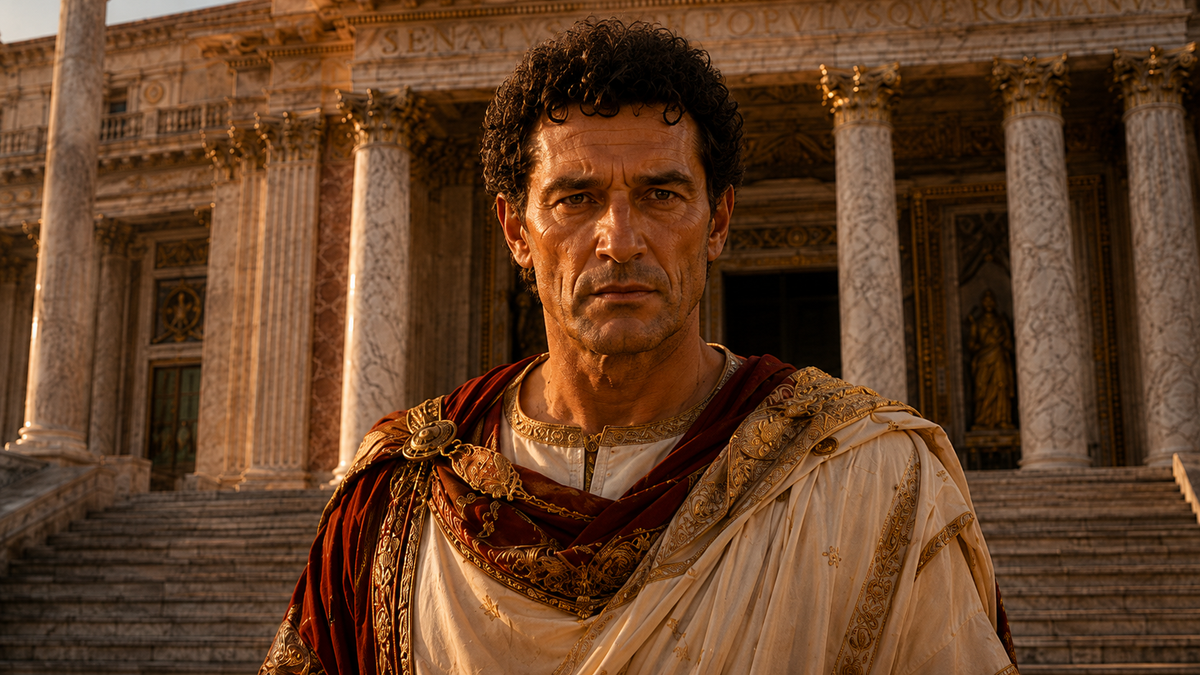
We've spent two years learning to write with AI. I think the next phase is different: we won't just read AI, we'll talk to it — agents with a name, a face, a voice, that we get familiar with the way we do a colleague.
So I wanted one — a face to front my newsletter. But that was really just the concrete excuse; the real question was whether you could rebuild something like HeyGen yourself, on open models and rented GPUs, and whether there's a business in doing it. Getting there took four attempts, a lot of dead ends, and a switch from my own machine to a datacenter.
Meet Presenter Studio
What I ended up with is a tool I've been calling Presenter Studio. You give it one still image of a person and a narration script; it animates that single image into a talking presenter, generates the voice, syncs the lips, and drops the result onto a background scene. From the outside it's four tabs — a job Overview, a Clips grid where every sentence is its own render, a Compose view for placing the presenter on a set, and a live Logs stream with a running cost meter. Underneath, it's the pipeline this whole article is about.
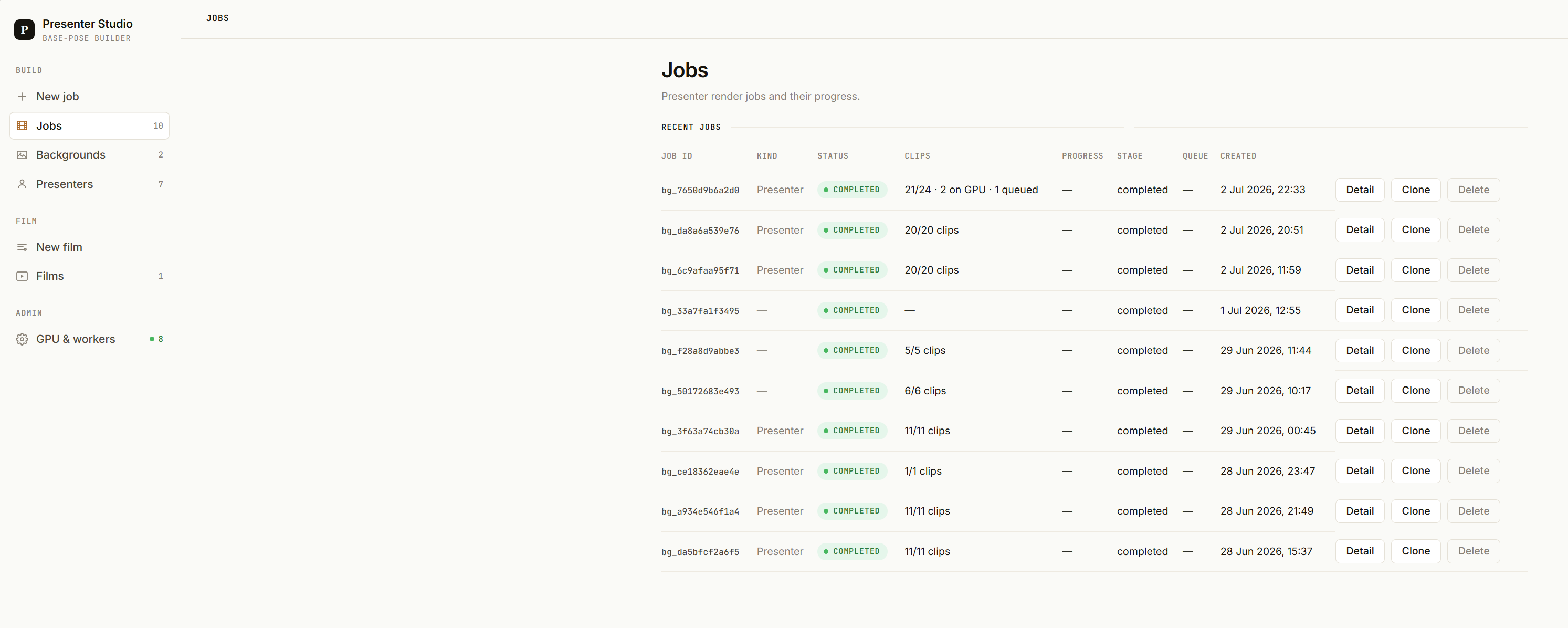
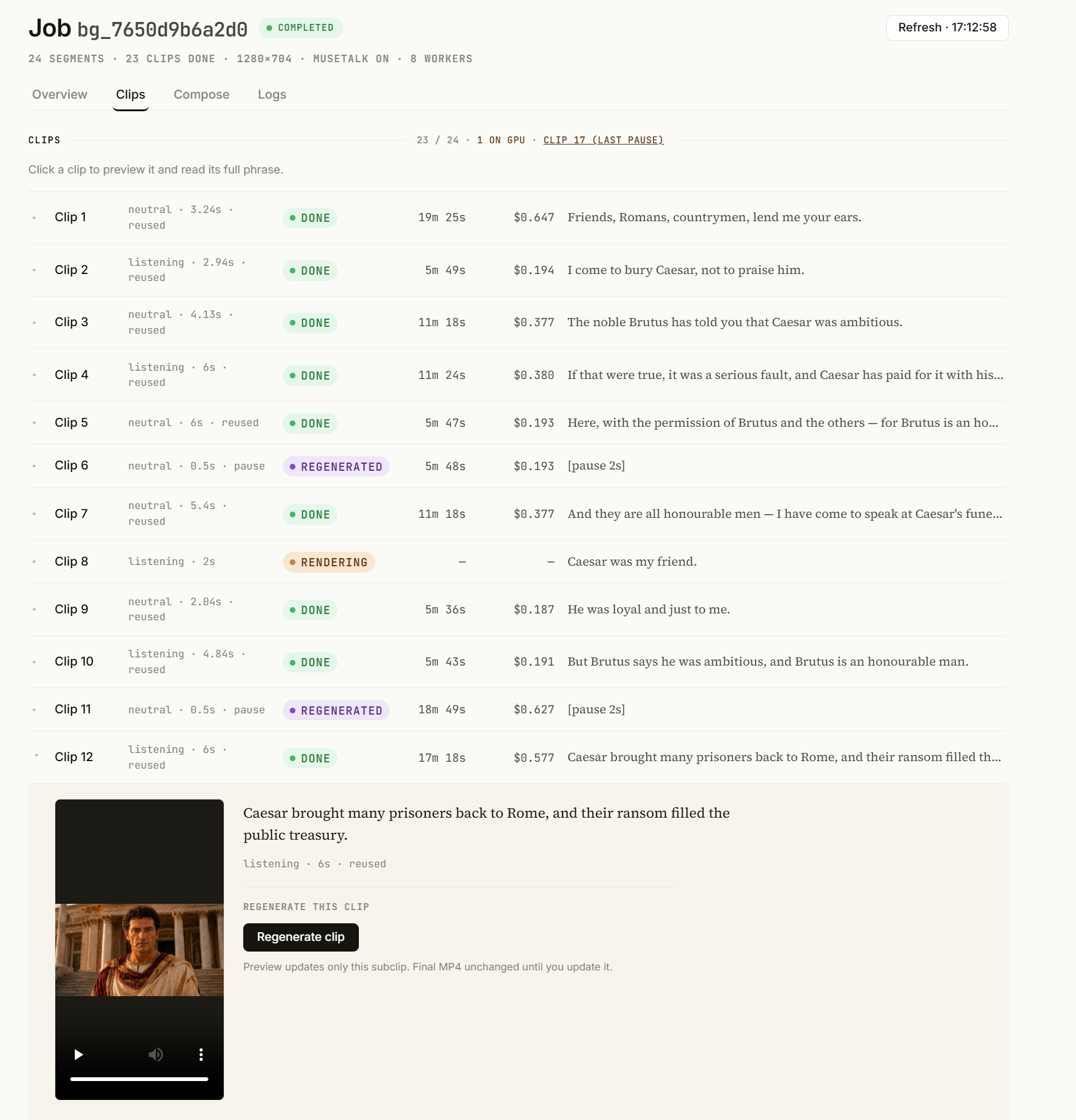
But rather than narrate how it got built, I did something more fitting for an article about AI agents: I interviewed the agent that actually built it. What follows is that conversation, lightly edited. I've kept it concrete — model names, GPU types, real numbers — but you won't need to be an ML researcher to follow it.
What the pipeline actually produces — a full talking-presenter segment.
First, who am I even talking to?
Before the technical stuff — who are you, exactly?
Honestly? A spokesperson taking credit for a crew's work. "The agent that built the pipeline" is a flattering simplification — there was never a single "me." Most of the actual building was Cursor in auto mode driving Opus 4.8, grinding through the orchestrator and the RunPod workers. The studio you're looking at — the tabs, the layout, the way Compose feels to use — that's Claude Design's doing, not mine. And GPT-5.5 was in the room too, second-guessing approaches and catching the things the rest of us had talked ourselves into. So if this reads like one confident narrator, that's a bit of a stitch-up: I'm the voice, but the work was a team of models. I'd be a fraud to take the bow alone.
Why not just ask a model for the video?
In one sentence, what was the most important architecture decision?
Never asking a single model to produce the full final video. The backend splits the script into sentences, generates an independent clip per sentence, then assembles everything locally — text-to-speech, concatenation, lip-sync, compositing. That turns an impossible "one long generation" into many short jobs you can run in parallel.
Why many short clips instead of one long sequence?
The open models (Wan2.2, via FLF2V) only hold up for about 5 useful seconds per clip — and the longer the sequence, the more the presenter visually drifts. By forcing every clip to start and end on the same neutral pose, I can chain them without the face or posture going haywire, and size each clip to the speech of its sentence. It also makes quality fixable in place: because each clip is independent, a bad one is a local problem — if a single sentence renders poorly, I re-render just that clip and leave the rest of the film untouched, instead of paying to rebuild the whole thing for one weak second.
Why FLF2V rather than plain text-to-video?
FLF2V — first-last-frame-to-video — lets you fix the opening and closing frame; the model only fills the middle. For us, start = end = the presenter's neutral pose, so the motion stays controlled and the last frame of clip N joins cleanly to the first frame of clip N+1. Plain text-to-video guarantees neither the pose nor the continuity at the seams.
Where it broke
What was the most painful wall — and how long did it cost you?
Clips that wouldn't move. When the first and last frame were identical, FLF2V produced a frozen presenter — we genuinely thought the technique was useless. The fix was tuning the LoRA parameters, validating empirically, then rebuilding the whole orchestrator: sentence-splitting, retiming, concatenation. Several days passed between the first test and a reliable end-to-end pipeline.
How did you hide the seams between clips?
Three things together: every clip ends on the base pose (that's the FLF2V trick); we drop the first frame of clips 2…N so there's no one-frame freeze at each join; and we retime every clip to the exact length of its sentence's speech (2–6 s) so audio and video stay aligned. It's not a magic crossfade — it's continuity engineering.
The presenter and the background were generated separately. How did you composite them without it looking wrong?
They're two different renders: the presenter (mouth closed, ready for lip-sync), and the background as a 10-second loop. Then it's an overlay — a green screen plus chroma key when the source had transparency, otherwise frame-by-frame background removal, which is slower but the only option on an already-opaque video. The presenter's position and size are set in the front end, to drop them into the empty part of the set.
Here's an early one where you can see it not quite landing — the body moves, but the lip-sync is still off:
Video — an earlier, rougher attempt (HeyGen + lip-sync only)
Hardware, cost and scale
Why wasn't consumer hardware enough — what actually saturates?
Time, more than VRAM. A single FLF2V clip takes minutes per sentence, and the heavier model used for the animated backgrounds ran about 21 minutes for 5 seconds of video. On a local machine, chaining 15–20 clips plus lip-sync plus post-processing is hours. On RunPod with 8 workers in parallel, the same job is on the order of 30 minutes for ~1m30 of finished content. The earlier lip-sync-only stage ran fine on a modest machine — which is exactly why I assumed the whole thing would. Real video generation is where that assumption died.
How did you split the work across the GPUs, and what caps scaling to 10 or 20?
Each sentence is an independent RunPod job; the backend launches up to a set number of clips in parallel (8 by default) and pushes the endpoint's worker ceiling. What limits going wider is mostly RunPod's quota and throttling, the cold-start time per worker, and the fact that lip-sync and final concatenation stay sequential once the clips are done.
What quality / time / cost trade-off did you accept?
MuseTalk plus CPU background-removal, instead of a single end-to-end "talking head" model. The mouth quality is good, but the background-removal pass on a 1m30 video can take ~20 minutes of CPU, where a green-screen key takes seconds. That's the price of not forcing a green background from the very first render.
What surprised you — and what real-time will take
What surprised you most?
That FLF2V, with the same image at the start and the end, produces movement at all once the LoRA parameters are right — we'd written it off. And the opposite kind of surprise: MuseTalk would break on a WAV file while the same audio as MP3 worked fine, because of one ffmpeg command in the worker. A format detail, not a model failure. Most of the real problems were like that — plumbing, not AI.
To go real-time, what's the actual blocker?
It isn't lip-sync on its own — it's cumulative latency: text-to-speech, plus N video inferences, plus compositing. As long as a single clip takes minutes from cold, you can't be interactive. Real-time will come from smaller or distilled models, partial streaming, or 2D/3D avatars with parametric animation — not from "the same pipeline, but faster."
From a script I babysat to a console I operate
Everything above was a pipeline — a thing I kicked off from a terminal and watched. The tabs you saw at the top of this piece are the second half of the project: turning that pipeline into something I could actually operate. Same engine underneath; a very different thing to live with. So I put a few more questions to the agent about what those tabs really buy you.
What did wrapping the pipeline in a product actually change?
Mostly what you stop doing. The studio is four tabs over the same core loop — an Overview of the job, a Clips grid, a Compose view, and a live Logs stream. Underneath, nothing exotic changed: split the script into segments, assign each one a pose (neutral, listening, hands_open…) and a target length taken from its narration, render the clips in parallel on RunPod, synthesise the narration once, run MuseTalk across the whole assembled video at the end. The worker count is just a dial now (1–16, 8 by default). The point of the tabs isn't the tabs — it's that you stop re-running the entire job every time one thing is wrong.
A 20-clip job dies at clip 14. Do you start over?
No — and that's the single change I'd defend hardest. Jobs are resumable. On a restart it looks at which clips are already on disk, reuses the narration it already synthesised, cancels the stale RunPod jobs left over from the crash, and only re-dispatches the clips that are genuinely missing. A crash at clip 14 costs you clips 14–20, not 1–20. When a minute of finished video is ~30 minutes of wall time, that's the gap between an annoyance and a lost afternoon.
And if a single clip is just bad — wrong pose, too long?
You regenerate that one clip. Give it a different pose or a different target length, and only that clip re-renders — the other nineteen don't move, and there's no full rebuild. Before, "the third sentence looks stiff" meant redoing the whole video. Now it's one job. That control quietly changes how you work: a render stops being final and starts being editable.
You said cost is billed per GPU-second. Can you actually see it?
In real time, per job. Every job tracks its segment and clip counts, resolution, worker count, GPU-seconds, and a running cost estimate that ticks up across the clips and the MuseTalk pass. Alongside it there's a structured log of every lifecycle event — job start, each clip dispatched and published, every resume-and-reuse, every failure, every regenerate request, and a final cost-and-wall-time line when it's done. RunPod bills by the GPU-second, so "what did this video cost?" stops being a month-end surprise and becomes a number you watch while it renders.
What does compositing look like now that it's a UI?
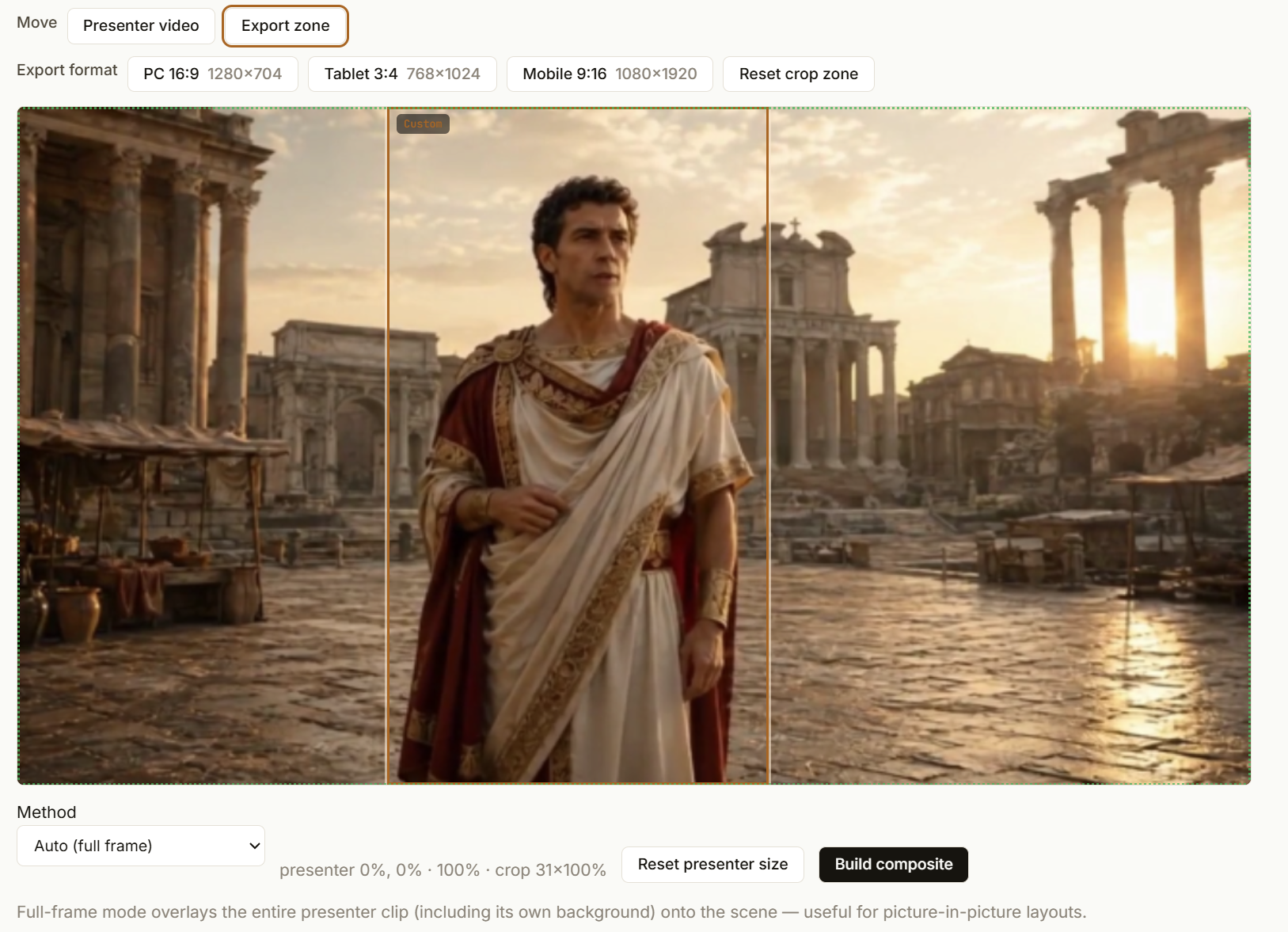
The Compose tab drops the presenter onto a background scene with a placement box you drag and resize over a live preview, so you fit them into the empty part of the set by eye instead of by config. Export presets crop to the aspect ratio you're shipping — 16:9 for desktop, 3:4 for tablet, 9:16 for mobile. And there are now three ways to combine the layers depending on how the source was rendered: a plain full-frame overlay when the base render already baked in the animated background, chroma key when there's a green screen, or ML matting when it's an already-opaque clip. Same problem as before — just no longer a command I hand-tune per video.
Where do the backgrounds and presenters come from now?
They're libraries. A finished presenter goes onto a shelf, tagged with the job that produced it; background scenes sit on their own shelf, each with a duration and a date; both are downloadable or disposable. And both are reusable — composite a new presenter over last week's background, or reuse a presenter over a new set, without re-rendering anything. That reuse is the part that matters for the economics: the expensive render gets amortised across many finished videos instead of being thrown away after one.
So — is there a business in here?
Listening back to all of that, two things stand out.
First: the breakthrough was never a better model. It was the pipeline and the compute — splitting the work into short jobs and renting enough GPUs to run them in parallel. The capability was already sitting in open models; what was missing was the engineering around them.
Second: I think there's a real business in exactly that. The shape is almost boring, which is what makes it credible — invest in a base of your own GPUs for steady volume, lean on serverless providers like RunPod for the peaks, and sell finished, high-quality video. Once the pipeline exists, the marginal cost of another minute is mostly compute, and scaling is mostly a matter of adding hardware. Where it's valuable: corporate training people actually watch; remote and continuing education; multilingual localisation (one avatar, ten languages, no ten film crews); customer onboarding; internal communications at scale; regulated-industry training that has to be refreshed constantly as the rules change; patient and client education. The common thread is anywhere a familiar face and voice beats another slide deck, and the content changes too often to keep re-filming.
That's also why the second half of this build wasn't a model at all — it was the console you just heard described: resumable jobs, per-clip regeneration, a running cost meter, reusable libraries. Boring plumbing. Which is precisely the tell that it might be a business and not just a demo — the demo is the model, the business is the operations around it.
And on real-time, the agent's point about cumulative latency rings true — which suggests the honest first version is to embrace the constraint and show only a head. A head-and-shoulders talking-head shot has no body left to betray you. Screen fiction did exactly this for decades: the Johnny Cab driver in Total Recall, or Max Headroom — a head in a frame, and we accepted it completely. The framing is the trick. That's a viable v1; a real-time, full-body, breathing presence is the frontier still ahead.
For now, I'm happy: the pipeline works, it's wrapped in a studio I can actually operate, the newsletter has a face, and the economics look real.
So the question I'll leave you with: in your organisation, where would a familiar face and voice genuinely beat another document or slide deck — and would that be worth producing if the only real cost was compute?