Langchain : Prompts


In this guide, we'll do what's shown in figure 1. First, we'll explain what a Prompt is and give some simple tips to get better at making prompts. Next, we'll talk about what a Langchain PromptTemplate is and go over its two types: PromptTemplate and ChatPromptTemplate
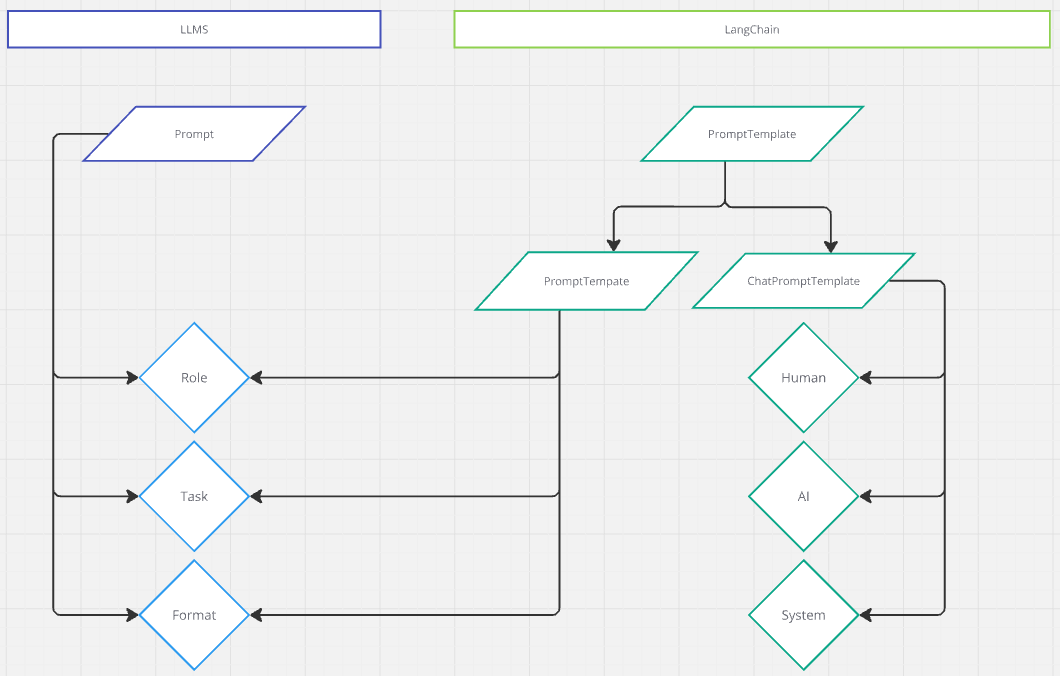
A prompt is like a starting point or instruction you give to a program before it begins creating an answer. It's what guides the program to focus on what you've asked it to do. Imagine the program like a detective solving a mystery: your prompt is the first clue they need to start their investigation. If you think of the program like a computer code reader, then the prompt is the first line of code it reads. When you're chatting with an AI, there's usually a part of the message that you never see. This hidden part helps set the rules and goals for the conversation. It might include things like your name, location, or the current time. It's important to understand that the AI itself doesn't change and only knows what it was taught up to a certain point. So, if you want it to have up-to-date information, like the current weather, you have to give it that info
The main features of a prompt are:
- Setting the Scene: Prompts give hints to the model about what you're looking for. Whether you want to create a story, get an answer to a
question, or finish some code, the prompt helps the model understand what to do. - Showing Your Intent: The prompt tells the model what you want, so it can generate answers that match what you're asking for.
- Being Detailed: The more specific your prompt, the more accurate and relevant the response will be. A vague prompt might give you broad or
unfocused answers
There are some easy tips to help you write a good prompt. One simple method is RTF, which stands for Role, Task, Format. Another method is RODES, which stands for Role, Objective, Details, Example, and Sense Check, great if you have examples to show. There's also RISEN, which stands for Role, Instruction, Steps, End Goal, and Narrowing (Constraints). These tips help you create clear and useful prompts depending on what you need!
Example of a RTF prompt:
“Act like a skilled carpenter. Can you guide me through building a laptop stand using wood in a step-by-step
instruction format?”
Example of a RODES prompt:
"Taking on the Role of a master woodworker, help me to define a clear Objective in creating a functional laptop
stand, offering all relevant Details and Specifics, perhaps providing Examples of similar designs, and
conducting a Sense Check to ensure practicality and feasibility in a home woodworking setting."
Example of a RISEN prompt:
"Assuming the Role of a seasoned DIY expert, with clear Instructions, guide me through the Steps to create a
wooden laptop stand, ensuring we achieve the End Goal of a sturdy and aesthetically pleasing stand, while
Narrowing our focus to using readily available tools and materials"When you need to ask similar questions or do the same tasks repeatedly, you can use a "prompt template" to make things easier and faster. A prompt template is like a fill-in-the-blank form that you can quickly complete with different details each time. For example, instead of writing a new question every time, you fill in the template with new information, and it automatically gives you a complete question
Why Prompt Templates ?- Stay on Track: Prompt templates help you ask questions the same way every time, so the answers you get are more dependable.
- Save Time: Using templates means you don't have to come up with new questions every time. This is super handy for big projects or regular tasks.
- Adapt Easily: Templates can be tweaked to fit different situations, making them useful for all kinds of questions.
- Fewer Mistakes: When you use templates, you're less likely to mess up, making it easier to talk to the model clearly and correctly
Translate the following text from {source_language} to {target_language}: {text}Langchain has two main types of prompt templates: PromptTemplate and ChatPromptTemplate.
- PromptTemplate: This is just like the normal template we talked about earlier.
- ChatPromptTemplate: This is a special version made for chat or messaging purposes
In the first example, you can see the usage of Prompt Template. An instance of from langchain_core.prompts.PromptTemplate is instantiated here. The method takes one parameter, 'template', which holds the prompt definition. The variables within this template are enclosed in curly braces {}.
These variables need to be provided when calling the language model (LLM)
from langchain_core.prompts import PromptTemplate

code_prompt = PromptTemplate.from_template("Write a very short {language} function that will {task}")We will not delve into the specifics of the Chat Prompt Template here, but rest assured, we will explore this concept in detail very soon. For now, it's important to remember that the chat mode defines three types of messages:
- System: Instructions or guidelines that set the context and behavior of the conversation. These messages are generally used to initialize the
- setting and direct the flow of interaction.
- Human: Messages generated by the user interacting with the system. These inputs drive the conversation and provide prompts for the AI to
respond to. - AI : Responses generated by the AI based on the given context and the human inputs. These messages aim to address the human queries and
sustain the dialogue
example_prompt = ChatPromptTemplate.from_messages(
[
("system", "You are a helpful AI bot helping me writting an article."),
("human", "{input}"),
("ai", "{output}"),
]
)
The OpenAI assistant playground (look at the example below) is a tool that shows you how messages are split between the System, Human, and AI
- System messages are like guides that tell the AI what to do, giving it instructions or a specific role.
- Human messages are everything you, the user, type in, like questions or comments.
- AI messages are the replies the AI gives based on your inputs
So, it’s like having a conversation where one part tells the AI how to act, you say something, and the AI answers back