So you want to build your own agent?

I was honestly shocked by how good cursor was at reasoning.
It was not just answering questions. It was figuring out what it needed to know, finding the right sources, and using them well.
This was not limited to code. It appeared able to operate within the infrastructure environment with unusual ease, despite no prior knowledge of it : discovering hosts and services, using existing interfaces, and chaining together multi-step tasks. For example, I could ask it to deploy a PostgreSQL instance on my NAS using Docker, build a Python image using uv, push it to my registry, and then deploy it to my Kubernetes cluster.
I was used to powerful AI assistants that could generate code, answer questions, and conduct deep research but this felt different. This was not a chatbot producing plausible output. It was closer to a human reasoning process that consistently produced accurate results.
It felt so far ahead of every other tool I had used over the previous three years that I became obsessed with figuring out how it was even possible. More than anything, I wanted to know exactly what Cursor was doing differently to make it so accurate.
I was starting to believe that Andrej Karpathy’s famous line, “The hottest new programming language is English,” was becoming reality. We had finally entered a new phase: models were now strong enough for engineers to build reliable agents on top of them, capable of supporting our daily work at an entirely new level.
After countless late nights trying and failing to reproduce it, and spending far too much on AI API calls that led nowhere, I finally got the result I was after and built T-1K, the agent I now use to manage all my infrastructure
Through this experience, I learned that building effective agents is less about imposing structure than about ensuring that the model reasons within a context optimized for the task and that we must be very careful with our architectural choices: each one should remove friction for the model, not constrain it with a rigid, algorithmic step-by-step process.
This article is based on what I learned while building T-1K. It is for anyone trying to build an agent of their own and avoid the same mistakes.
The naive approach
I quickly settled on an orchestrator–worker architecture. The idea was straightforward: the orchestrator defined the overall scenario, while each subagent handled a single task as an autonomous unit, relying on operating system tools and any other resources required to complete it. When a subagent returned, the orchestrator collected the results and determined the next step.
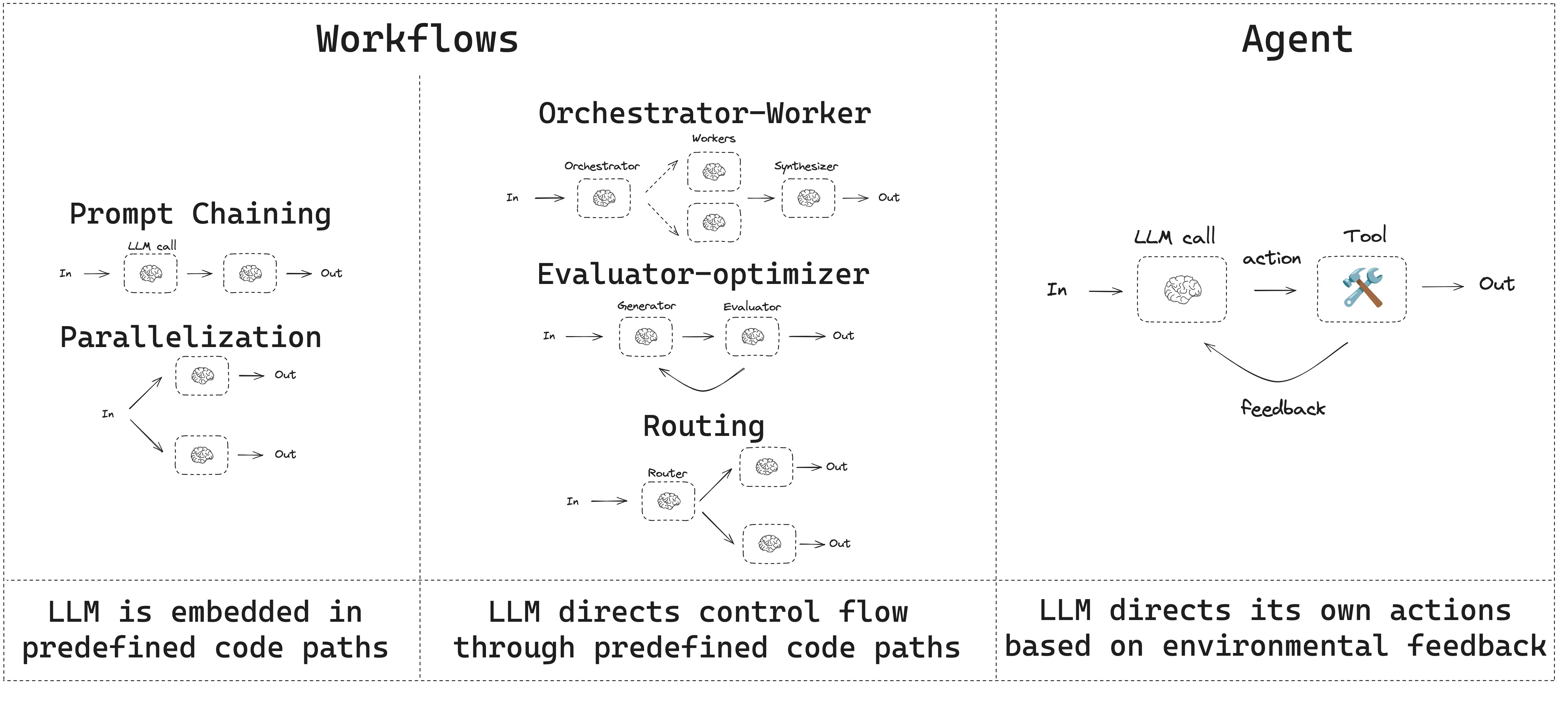
I started with LangChain Deep Agents to avoid rebuilding the agent–coordinator communication layer from scratch. To adapt it, I wrote middleware to judge whether a task had truly succeeded, provide the orchestrator with the context it needed for its next decision, and add an expanding set of skills, some distilled from Cursor, to keep it from getting lost in long, multi-step tasks.
- And it kind of worked, but at the cost of a lot of complexity -
Even with those skills, it did not always work, which was sometimes more frustrating than complete failure. A typical failure looked like this:
- The orchestrator delegated a subtask.
- The worker produced something plausible.
- Lacking strong ground truth, and sometimes misled by polluted context, the orchestrator incorrectly inferred that the task had succeeded.
- The workflow proceeded on a false premise, and the later steps unraveled into nonsense.
That led me to the first important lesson:
Keep the control loop close to the model
So I ended up with a much simpler setup that gave most of the control back to the LLM: I kept the framework layer as thin as possible, stayed as close to the model’s own loop as I could, and introduced only the code and isolation needed to keep the context clean.
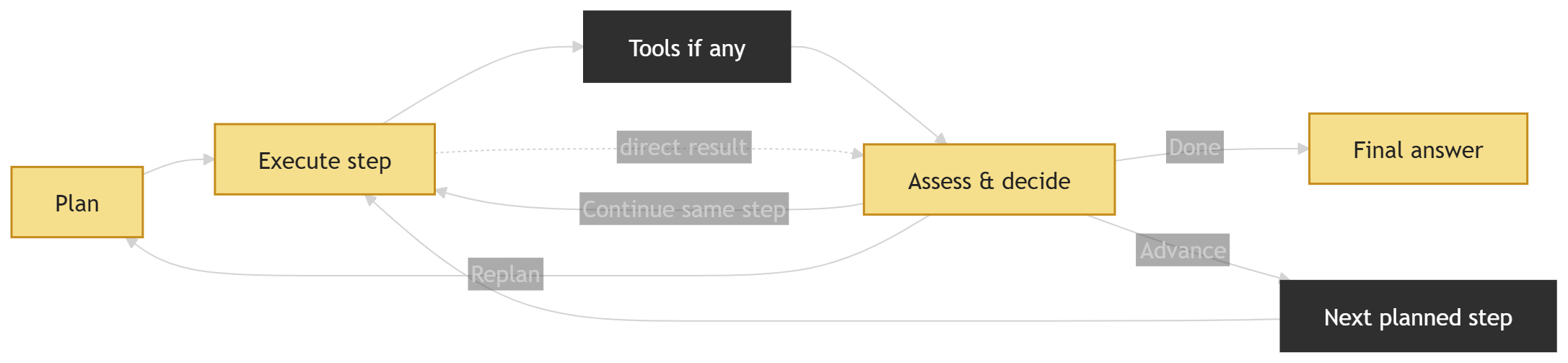
The loop itself was deliberately simple:
- Plan
- Execute one step
- Assess the result and decide what to do next
- Repeat
The key shift in my implementation was to separate the planner from the executor, instead of treating the scenario as an external object that had to be constantly serialized, fed back into the loop, and entangled with raw execution traces. The plan lived directly in the planner’s own context, while the executor ran in a separate loop with its own context containing tool calls, observations, and intermediate results. The assess-and-decide stage acted as the bridge between planning and execution, reducing what flowed back into planning to a compact decision signal plus a recent slice of execution context: enough to validate the current step, move to the next one, or trigger a replan when needed.
From there, the loop naturally split into three roles:
Planner: builds the plan, defines success criteria for each step, and revisits the plan only when something has gone wrong. When replanning is needed, it does not consume the full execution history. Instead, it receives a compact context built from the assessor’s signal and a recent slice of the transcript.
Executor: carries out the current step. It decides which tools to use, whether calls can safely run in parallel, and works with the cumulative context of the run so far. In that sense, execution remains stateful, but that state stays on the execution side.
Assessor: checks whether the current step actually satisfied its success criteria. It reads the recent execution trace, decides whether the loop should continue, advance, or replan, and serves as the join between planner and executor by reducing execution output to only what the planner needs..
That division turned out to matter. It kept planning structured, execution flexible, and verification narrow. In practice, it also reduced context pollution and made the whole loop more stable than a design in which every role constantly shared the same full history.
Save artifacts in a structured store, not in your context
One of the clearest lessons from this implementation was that not every result belongs in the model’s working context. Some outputs are simply too large or too noisy to keep passing through the loop. Intermediate reports, generated documents, raw tool outputs, and execution traces are often more useful when stored externally.
Returning short summaries or references instead keeps the context focused and manageable, while allowing larger outputs to be stored externally and retrieved only when needed. That balance keeps the loop readable without losing access to the underlying data.
The rule is simple: keep the context focused on decisions, and keep bulky results outside the loop. The model only needs enough information to understand what happened, what worked, what failed, and what to do next.
This matters even more in multi-stage loops. If every tool returns its full output inline, noise builds up quickly and starts to crowd out the information that actually matters for reasoning.
Know the difference between model, skills and tools
This sounds trivial, but it is one of those distinctions that only becomes obvious after things start breaking.
The right mental model is this: the model is the strategist. It is the only part of the system that should be doing open-ended problem solving, including decomposition, prioritization, exception handling, and deciding what evidence it needs next.
Skills are macros. Skills package domain-specific workflows the model can load when appropriate, often combining multiple tools into a repeatable recipe. But to be perfectly clear about this concept, think of a skill as a shortcut to a result the model could have reached on its own.
The fastest way to get lost is to treat a skill as a procedure for obtaining a result the model would not otherwise be able to produce.
Tools are primitives. They should do one thing, predictably, and return observables. In practice, the best tools for infrastructure work are often just thin shells around existing system interfaces such as commands, APIs, and queries, because those interfaces already encode years of battle-tested behavior. A tool can be exposed through MCP, for example through a sandbox with shell access, or be directly callable by the orchestrator, such as today() or timezone().
In other words, the model should combine capabilities to find a path to the solution. Tools should take action and produce factual evidence. Skills should package repetitive tasks to make execution faster and cheaper.
Once that clicks, the default posture changes. Instead of writing skills to compensate for model confusion, it becomes much more effective to improve tools, observability, and validation criteria so the model can stay oriented while solving the problem.
Structure tool interactions
When interacting with tools, it helps to stop thinking in terms of conversation and start thinking in terms of execution. A tool should not have to interpret vague requests. It should receive precise instructions that make the action, the context, and the constraints explicit.
The same principle applies in the other direction. The response should also be structured. Instead of returning one block of text that mixes status, output, and errors together, a tool should clearly separate whether the action succeeded, what it returned, what failed if something went wrong, and any context needed to interpret the result.
The lesson is simple: good tool use depends on structured exchanges on both sides. The request must be organized so the tool can act reliably, and the response must be organized so the caller can immediately understand and use the result.
Use profile to manage rights not skills or prompt
A prompt is not a permission system and neither is a skill. Even if you write the world’s best “don’t do dangerous things” instructions, you have not enforced anything. Real safety comes from hard barriers: user accounts, filesystem permissions, network segmentation, Kubernetes RBAC, admission controls, and audit logs.
The same principle applies to agents. If you want to guarantee that an agent cannot perform a certain action, do not tell it not to:
deny it access to the toolthat would make that action possible. Group the tools needed for each role into a dedicated profile, and force the agent to build its scenario using only the tools exposed through that profile.
In practice, a profile should function exactly like a security team granting clearance for a defined role: it determines what the agent is actually allowed to access and do.
The operating system is the default tool
I ended up with a simple rule: the operating system is the default tool. From there, the first mistake to avoid is rewriting tools that already exist in it.
If a task can be done through an existing CLI or operating-system tool, the agent should use that path first. Any extra tools it needs should be available in the sandbox rather than reimplemented
The OS is already a sensor array: filesystem, process table, logs, network tools, CLIs. The harness should help the model rely on those sensors constantly, rather than replace them with abstractions of its own.
At some point, the problem shifted: it was no longer about building an AI to manage infrastructure in the abstract, but about making sure the executor could autonomously follow the same sequence of commands and checks that an expert would have used manually, while trusting the orchestrator to find the right path.
Prefer the CLI as the agent’s primary interface to external systems
Once you treat the operating system as the source of truth, the next rule follows naturally: prefer the CLI as the agent’s primary interface to external systems.
CLI tools are often the right execution surface for agents for three reasons.
- First, they are already built for automation. Tools like
kubectlanddockerexpose structured output such as JSON and YAML, giving the model evidence it can inspect rather than vague text it has to interpret. - Second, they already embody the authentication model of your environment. Your
kubeconfig, Docker context, and SSH configuration are the real operational profiles that define what can be accessed. This fits naturally with the same profile-based approach used for tools: instead of inventing a separate permission model for authentication, you can apply the same mechanism to both, exposing through each agent profile only the CLI tools and credentials that belong to that role. - Third, they reduce custom integration code. If a system already has a solid command-line interface, the agent should use it directly rather than rely on wrappers or reimplementations. That keeps the stack simpler, clearer, and easier to audit.
Bottom line: building a strong agent is ultimately less about adding intelligence around the model than about removing everything that gets in its way. A tight control loop, clear context boundaries, simple observable tools, profile-based permissions, and direct access to the operating system and CLI create the conditions that allow the model to do what it is now surprisingly good at: reasoning, adapting, and executing.
By following these principles, you should be able to build a highly efficient agent of your own—one that is not only capable of completing complex tasks, but also reliable enough to become a real part of your daily workflow.
Have fun!